

Introduction: Why Marketing Automation is No Longer Optional
In today’s competitive digital landscape, businesses that rely on manual processes are falling behind. Whether you’re a small business owner, a startup founder, or a digital marketing consultant, you need tools that can automate repetitive tasks, nurture leads, and drive consistent growth.
This is where HubSpot marketing automation becomes a game changer.
From email campaigns to lead scoring and customer segmentation, HubSpot empowers businesses to do more with less effort. But beyond automation, it introduces a powerful concept that every business must embrace — CRM-driven marketing.
In this comprehensive guide, we’ll cover:
- What HubSpot marketing automation is
- Why CRM is critical for business owners
- Benefits of HubSpot CRM for small businesses
- HubSpot vs other CRM tools
- Pros & cons of HubSpot
- FAQs and practical insights
What is HubSpot Marketing Automation?
HubSpot marketing automation refers to using the HubSpot platform to automate marketing tasks such as:
- Email marketing campaigns
- Lead nurturing workflows
- Customer segmentation
- Social media scheduling
- Analytics and reporting
Unlike traditional tools, HubSpot combines automation with a centralized CRM system, making it easier to track every customer interaction.
Key Features of HubSpot Marketing Automation
- Workflow Automation – Automate emails, follow-ups, and actions
- Lead Scoring – Prioritize high-quality leads
- Email Personalization – Send targeted messages
- Behavior Tracking – Understand user activity
- Analytics Dashboard – Measure performance in real-time
Why CRM is Important for Business Owners
Before diving deeper into HubSpot, let’s understand why CRM (Customer Relationship Management) is essential.
What is CRM?
CRM software helps businesses manage customer data, interactions, and relationships throughout the customer lifecycle.
Popular CRM tools include:
- HubSpot CRM
- Salesforce
- Zoho CRM
- Pipedrive
Importance of CRM for Business Owners
1. Centralized Customer Data
No more scattered spreadsheets or lost contacts. Everything is stored in one place.
For a growing business, relying on sticky notes, disparate inbox folders, and chaotic spreadsheets is a recipe for missed opportunities. A centralized Customer Relationship Management (CRM) platform acts as your business’s single source of truth. Every phone call, email exchange, support ticket, and purchase history is automatically logged into a single, unified profile for each customer.
When you integrate powerful tools like HubSpot Marketing Automation into this centralized hub, the data becomes active rather than static. Instead of just storing a contact’s phone number, your system tracks exactly which blog posts they read, which emails they opened, and when they last visited your pricing page. This gives your entire team immediate context, ensuring no valuable data slips through the cracks.
2. Better Lead Management
Track where leads come from and how they interact with your business.
Not all leads are created equal, and treating a cold prospect the same way you treat a hot lead wastes time and resources. Effective lead management allows you to visualize your entire sales pipeline and understand exactly which marketing channels—whether it is organic search, paid ads, or social media—are driving the highest-quality traffic.
By leveraging HubSpot Marketing Automation, you can set up automated lead scoring systems. The software automatically evaluates a lead’s behavior based on their interactions with your website. If a prospect downloads a whitepaper or attends a webinar, the system instantly updates their score and triggers an automated email sequence tailored to their specific interests. This ensures your sales team spends their energy on the prospects most likely to close.
3. Improved Customer Experience
Personalized communication increases customer satisfaction.
Modern consumers expect businesses to understand their specific needs and preferences. If a customer has to repeat their issue to three different departments, or if they receive generic, irrelevant marketing offers, their satisfaction plummets. A CRM ensures that anyone who interacts with a client has their entire history right in front of them.
With HubSpot Marketing Automation, personalization scales effortlessly. Instead of sending out massive, generic email blasts, you can segment your audience by industry, company size, or past purchasing habits. The automation engine can then dynamically swap out content, product recommendations, and greeting lines so that every email feels like a 1-to-1 conversation, drastically improving retention and loyalty.
4. Sales & Marketing Alignment
Your marketing and sales teams work with the same data.
Historically, marketing and sales have operated in silos, often leading to friction over lead quality and conversion ownership. A CRM bridges this gap by providing both departments with a shared dashboard. Marketing can see exactly which of their campaigns resulted in actual closed revenue, while sales gets a clear roadmap of what marketing materials the prospect engaged with before the first call.
Implementing HubSpot Marketing Automation solidifies this alignment through automated handoff workflows. The moment a lead meets a specific criteria (like requesting a live demo), the automation platform instantly assigns the task to a sales representative, sends them an internal alert, and transfers the complete behavioral history. This seamless transition ensures a fast response time, keeping the momentum alive.
5. Increased Revenue
Better targeting = higher conversions.
At the end of the day, a CRM is a growth engine. By eliminating manual data entry and administrative bottlenecks, your team can focus on what they do best: building relationships and closing deals. The deep analytics provided by a CRM allow business owners to forecast revenue accurately, identify bottlenecks in the sales pipeline, and replicate their most successful sales strategies.
When combined with HubSpot Marketing Automation, your path to increased revenue becomes predictable. Automated cart abandonment emails, timely cross-sell recommendations, and targeted re-engagement campaigns work silently in the background 24/7. Because your marketing is highly targeted based on real-time CRM data, your conversion rates rise, your sales cycles shorten, and your overall lifetime customer value grows.
HubSpot Marketing Automation: Why CRM Is Essential for Business Owners (Detailed Guide)
When we talk about hubspot marketing automation, we’re not just referring to sending emails or running campaigns—it’s about building a complete system that manages, tracks, and grows your customer relationships. At the core of this system is the CRM (Customer Relationship Management), and this is where HubSpot truly shines.
Let’s break down each benefit in detail so you understand how hubspot marketing automation transforms your business operations and revenue.
1. Centralized Customer Data
One of the biggest problems business owners face is scattered information—contacts in Excel sheets, emails in Gmail, notes in WhatsApp, and leads in different tools.
With hubspot marketing automation, everything is stored in one unified dashboard.
What this means:
- Every contact has a complete profile:
- Name, email, phone number
- Website visits
- Email interactions
- Purchase history
- All conversations (emails, calls, chats) are logged automatically
Why it matters:
- No more lost leads
- No duplication or confusion
- Easy access for your entire team
👉 Example:
If a prospect visited your website, opened your email, and filled a form—HubSpot records everything in one place, giving you full visibility.
2. Better Lead Management
Without a proper system, leads slip through the cracks. But with hubspot marketing automation, you can track and manage every lead intelligently.
Key capabilities:
- Track lead sources (Facebook Ads, Google Ads, organic traffic, etc.)
- Monitor behavior (email opens, clicks, page visits)
- Assign leads automatically to your sales team
- Use lead scoring to prioritize high-quality prospects
Why it matters:
- You focus on high-intent leads
- Faster response time
- Higher chances of conversion
👉 Example:
A user clicks your email and visits your pricing page—HubSpot can automatically mark them as a hot lead and notify your sales team instantly.
3. Improved Customer Experience
Modern customers expect personalized communication, not generic messages.
With hubspot marketing automation, you can deliver exactly that.
How it works:
- Segment your audience based on behavior, interests, or demographics
- Send targeted emails based on user actions
- Automate follow-ups tailored to each stage of the customer journey
Why it matters:
- Customers feel understood
- Higher engagement rates
- Stronger brand trust
👉 Example:
Instead of sending the same email to everyone, you can send:
- One email for new leads
- Another for returning visitors
- A different one for ready-to-buy prospects
4. Sales & Marketing Alignment
In many businesses, marketing and sales teams work in silos. This leads to:
- Miscommunication
- Lost opportunities
- Poor conversion rates
HubSpot marketing automation solves this by providing shared data and insights.
What changes:
- Marketing sees which campaigns generate leads
- Sales sees how leads interacted before reaching them
- Both teams work on the same CRM data
Why it matters:
- Smooth handoff from marketing to sales
- Better follow-up strategies
- Improved closing rates
👉 Example:
Your sales team can see:
- Which email the lead opened
- Which page did they visit
- What service are they interested in
This allows for highly relevant conversations.
5. Increased Revenue
Ultimately, every business goal comes down to revenue—and this is where hubspot marketing automation delivers massive impact.
How it increases revenue:
- Better targeting → Right message to the right audience
- Faster follow-ups → Higher conversion chances
- Automation → More leads nurtured without extra effort
- Data insights → Continuous campaign improvement
Why it matters:
- More qualified leads
- Higher conversion rates
- Better ROI on marketing spend
👉 Example:
Instead of manually following up with 100 leads, HubSpot can:
- Automatically send sequences
- Notify you of interested prospects
- Help you close deals faster
Growth Engine
HubSpot marketing automation is not just a tool—it’s a growth engine for modern businesses.
It helps you:
- Organize your data
- Understand your leads
- Personalize your communication
- Align your teams
- And ultimately, increase your revenue predictably
If you’re serious about scaling your business, implementing a CRM powered by hubspot marketing automation is no longer optional—it’s essential.
HubSpot Marketing Automation: How It Helps Your Business Grow Faster and Smarter
When businesses invest in hubspot marketing automation, they’re not just buying a tool—they’re building a scalable system for lead generation, nurturing, and sales growth. With platforms like HubSpot, you can automate repetitive tasks while improving personalization and conversions at every stage of the customer journey.
Let’s break down exactly how hubspot marketing automation drives real business growth:
1. Lead Generation on Autopilot
One of the biggest advantages of hubspot marketing automation is its ability to generate leads 24/7 without manual effort.
How it works:
- Create high-converting landing pages without coding
- Add smart forms to your website
- Use chatbots/live chat to capture visitor information in real time
Example:
A visitor lands on your website at midnight:
- A chatbot engages them
- Collects their email and requirement
- Automatically stores it in your CRM
👉 Result: You wake up with qualified leads already in your pipeline.
2. Lead Nurturing
Not every lead is ready to buy instantly. This is where hubspot marketing automation truly shines.
What you can do:
- Send drip email campaigns automatically
- Trigger emails based on actions (opens, clicks, page visits)
- Educate and build trust over time
Example workflow:
- Day 1 → Welcome email
- Day 3 → Case study
- Day 5 → Service offer
- Day 7 → Follow-up
👉 This keeps your brand top-of-mind and gradually converts cold leads into warm prospects.
3. Customer Segmentation
With hubspot marketing automation, you don’t send the same message to everyone—you send the right message to the right person.
You can segment based on:
- Demographics (location, job role, industry)
- Behavior (email opens, clicks, website visits)
- Interests (services viewed, downloads)
Example:
- Visitors who checked your pricing page → Send sales-focused email
- Blog readers → Send educational content
👉 Result: Higher engagement and better conversion rates.
4. Sales Pipeline Automation
Managing leads manually can be messy and inefficient. HubSpot marketing automation simplifies your entire sales process.
Key capabilities:
- Automatically assign leads to sales reps
- Move deals across stages (New → Contacted → Qualified → Closed)
- Set automated reminders and follow-ups
Example:
- A lead fills out a form → Automatically added to pipeline
- Sales rep gets notified instantly
- Follow-up email is triggered automatically
👉 This ensures no lead is missed and every opportunity is tracked.
5. Performance Tracking
he real power of hubspot marketing automation lies in its analytics and reporting.
You can track:
- Email open and click rates
- Landing page conversions
- Campaign ROI
- Sales performance
Example:
- If Email A has 40% open rate vs Email B with 20%
👉 You optimize your subject lines accordingly
Outcome:
Higher ROI over time
Better decision-making
Continuous campaign improvement
HubSpot vs Other CRM Tools (Detailed Comparison)
Let’s compare HubSpot with other popular CRM platforms.
🆚 HubSpot vs Salesforce
| Feature | HubSpot | Salesforce |
|---|---|---|
| Ease of Use | Very Easy | Complex |
| Pricing | Free + Paid | Expensive |
| Automation | Strong | Very Advanced |
| Best For | SMBs | Enterprises |
👉 Verdict: HubSpot is better for beginners; Salesforce is better for large enterprises.
🆚 HubSpot vs Zoho CRM
| Feature | HubSpot | Zoho CRM |
|---|---|---|
| UI/UX | Modern | Slightly outdated |
| Pricing | Free plan available | Affordable |
| Integrations | Extensive | Good |
| Learning Curve | Easy | Moderate |
👉 Verdict: HubSpot wins in usability; Zoho is cost-effective.
🆚 HubSpot vs Pipedrive
| Feature | HubSpot | Pipedrive |
|---|---|---|
| CRM Strength | Strong | Sales-focused |
| Automation | Advanced | Limited |
| Marketing Tools | Built-in | Limited |
👉 Verdict: HubSpot is better for full marketing + CRM; Pipedrive is for sales teams.
Pros and Cons of HubSpot
✅ Pros of HubSpot
- Free CRM with powerful features
- Easy-to-use interface
- All-in-one marketing platform
- Excellent automation tools
- Strong analytics and reporting
- Great for small businesses
❌ Cons of HubSpot
- Paid plans can become expensive
- Advanced features locked behind higher tiers
- Limited customization compared to enterprise tools
- Learning curve for advanced automation
Why Small Businesses Should Choose HubSpot Marketing Automation
If you’re a small business owner, keeping up with marketing can feel like a secondary full-time job. Between sending emails, tracking leads, and posting on social media, your day gets eaten up fast. This is exactly where HubSpot Marketing Automation comes in—it acts like an extra, highly efficient team member that never sleeps.
By automating repetitive tasks, it bridges the gap between limited small business resources and enterprise-level marketing results. Here is exactly why it is the ideal growth engine for your business:
1. Saves Time
As a small business owner, time is your most precious and limited resource. You can’t afford to spend hours manually copying lead information from a website form into a spreadsheet, or individually emailing every new subscriber.
HubSpot Marketing Automation eliminates this tedious operational drag through intuitive email workflows and automated data management.
- Instant Follow-ups: The moment a potential customer downloads a guide or fills out a contact form, HubSpot automatically triggers a personalized welcome email sequence.
- Data Harmony: It syncs seamlessly with your built-in CRM (Customer Relationship Management), updating lead statuses and tracking user interactions without you lifting a finger.
Instead of getting bogged down in administrative tasks, your team is freed up to focus on high-impact strategies and closing deals.
2. Increases ROI
Every dollar matters when you are managing a small business budget. General, blast-style marketing is highly inefficient and wastes money on people who aren’t interested in your product. HubSpot Marketing Automation maximizes your Return on Investment (ROI) by ensuring your marketing spend is hyper-targeted.
- Behavior-Based Triggers: Instead of sending the same email to your entire list, you can set up automation based on specific actions. If a lead visits your pricing page twice in one day, HubSpot can automatically send them a case study or a consultation offer.
- Lead Scoring: The platform automatically scores leads based on their engagement level. This means your sales team doesn’t waste time chasing cold leads; they only step in when HubSpot flags a prospect as “hot” and ready to buy.
Better targeting inherently leads to higher conversion rates, making your overall marketing spend significantly more efficient.
3. Improves Customer Relationships
In the small business world, your biggest competitive advantage over massive corporations is your ability to build genuine, human connections. However, maintaining that personal touch becomes incredibly difficult as your customer list grows.
With HubSpot Marketing Automation, personalization goes far beyond just dropping a first name into an email subject line.
- Tailored Customer Journeys: The software allows you to segment your audience based on their industry, company size, or specific interests. A retail customer receives content entirely different from a wholesale partner.
- Timely Touchpoints: Automation ensures that your brand stays top-of-mind by sending relevant content exactly when the customer needs it—whether that’s a helpful how-to guide right after a purchase, or a gentle re-engagement email if they haven’t visited your site in a while.
This consistent, highly relevant communication builds deep customer trust and positions your business as an attentive partner rather than a generic vendor.
4. Scales with Your Business
One of the biggest mistakes small businesses make is choosing a software tool that they will outgrow in twelve months, forcing a painful and expensive data migration later on. HubSpot prevents this issue by offering a flexible ecosystem that expands alongside your success.
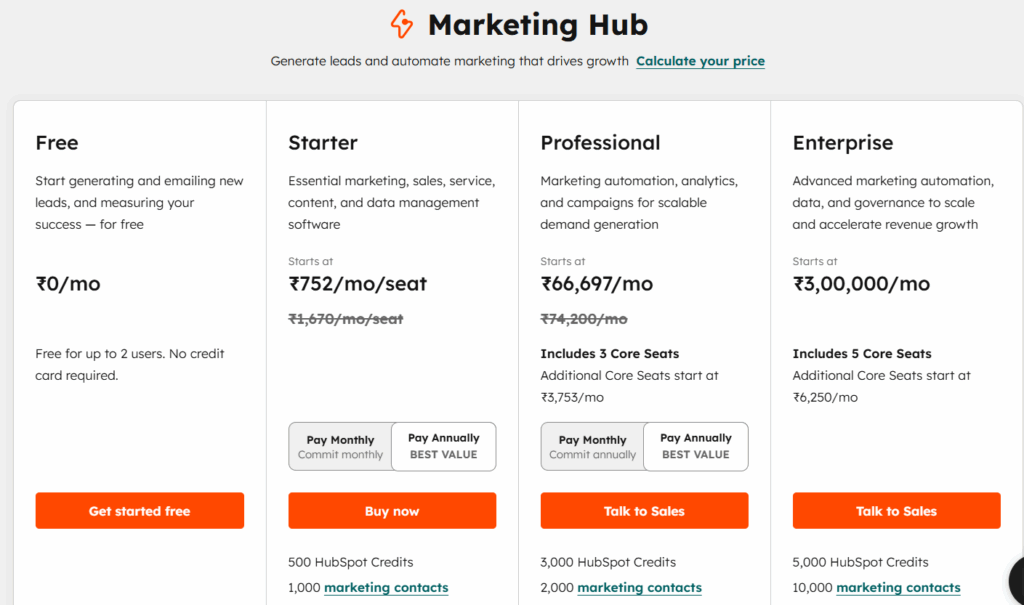
- Start for Free: HubSpot offers powerful free tools—including forms, landing pages, email marketing, and their foundational CRM—allowing you to experiment and see immediate value without an upfront financial commitment.
- Grow Gradually: As your revenue increases and your marketing strategies become more sophisticated, you can easily unlock advanced tiers (Starter, Professional, and Enterprise). You only pay for the advanced automation features, contact limits, and deep analytics as your business actually requires them.
By choosing HubSpot Marketing Automation, you are investing in a permanent foundational tool that fits your budget today and supports your growth ambitions for years to come.
Here is a detailed breakdown of the best practices for maximizing your HubSpot Marketing Automation, keeping your exact structure intact while expanding on how to execute each strategy effectively.
Best Practices for Using HubSpot Marketing Automation
🔹 Start Simple
Don’t overcomplicate workflows initially. When first diving into HubSpot Marketing Automation, it is incredibly easy to build massive, multi-branched workflows that ultimately break or become impossible to troubleshoot.
- Map it out first: Before touching the workflow builder, draw your automation flow on a whiteboard or a tool like Miro.
- Pick one goal: Start with a single, clear objective per workflow—such as a 3-email welcome sequence for new newsletter subscribers or an automated internal notification when a high-value form is submitted.
- Test meticulously: Use HubSpot’s “Test” feature to simulate how a contact moves through the enrollment triggers and delays before turning the workflow live.
🔹 Use Lead Scoring
Focus on high-quality leads. To prevent your sales team from wasting time on cold prospects, use the predictive or manual lead scoring capabilities within your HubSpot Marketing Automation setup.
- Define positive attributes: Assign points for high-intent actions, such as visiting your pricing page, downloading a bottom-of-the-funnel whitepaper, or opening multiple emails in a single week.
- Incorporate negative attributes: Deduct points for indicators of low fit, such as a job title containing “student,” a generic email domain (like Gmail or Yahoo) if you are strictly B2B, or prolonged periods of inactivity.
- Automate the handoff: Set up an automation trigger that automatically assigns a lead to a sales representative and creates a “Deal” the exact moment their lead score crosses your target threshold (e.g., reaching 50 points to become a Marketing Qualified Lead).
🔹 Personalize Emails
Use names, behavior, and interests. Static, generic blast emails are a quick way to land in the spam folder. True personalization goes way beyond just pulling a contact’s first name into the subject line.
- Leverage behavioral triggers: Use HubSpot Marketing Automation to send hyper-targeted emails based on specific actions, like browsing a particular product page or abandoning a registration form.
- Use smart content blocks: Instead of building five different emails for five different audiences, use HubSpot’s “Smart Content” features to dynamically swap out text, images, or Call-to-Actions (CTAs) within a single email template based on the recipient’s lifecycle stage or industry.
- Segment by interest: Keep your database clean by automatically tag-segmenting contacts into specific list buckets based on the types of content they interact with most.
🔹 Track Analytics
Continuously optimize campaigns. Automation is never a “set it and forget it” project. To squeeze the maximum ROI out of your HubSpot Marketing Automation platform, you need to rely on data-driven iterations.
- Monitor core metrics: Keep a close eye on workflow enrollment rates, email open/click rates, and overall conversion velocity (how fast a contact moves from one stage to the next).
- A/B test your automations: Routinely test different subject lines, email delivery delays, and CTA designs within your workflows to find the highest-performing variations.
- Watch for drop-offs: Look at your workflow analytics to see exactly where contacts are dropping out of your funnels. A massive drop-off at Step 3 usually means that specific piece of content isn’t hitting the mark.
🔹 Integrate with Other Tools
Connect with tools like:
Mailchimp
While HubSpot offers a robust, all-in-one email solution, many businesses utilize Mailchimp for specific e-commerce newsletters, event invites, or transactional updates. Syncing Mailchimp with your HubSpot Marketing Automation ensures that contact unsubscribes, bounces, and engagement histories reflect accurately across both databases without manual data entry.
Google Analytics
Connecting HubSpot to Google Analytics allows you to bridge the gap between anonymous website behavior and known contact identities. You can trace exactly which blog posts, organic search terms, or paid ad campaigns originally brought a contact to your site, allowing your automated HubSpot campaigns to pick up seamlessly where your acquisition channels left off.
Zapier
For tools that don’t have a native, built-in integration with HubSpot, Zapier acts as the ultimate bridge. It allows you to feed data into your HubSpot Marketing Automation engine from thousands of external platforms—whether that means instantly enrolling a lead into a HubSpot workflow when they register on an external webinar platform, or pinging a custom internal chat channel when a major deal closes.
Real-World Use Case: How Businesses Use HubSpot
Imagine you run a digital marketing agency:
- A visitor lands on your website
- Fills out a form → added to CRM
- Receives automated email sequence
- Gets nurtured with content
- Book a call via automation
- Sales team closes the deal
All of this happens automatically using HubSpot.
Common Mistakes to Avoid
- Ignoring CRM data
- Over-automating without personalization
- Not tracking performance
- Using too many tools instead of one platform
Future of Marketing Automation
Marketing automation is evolving rapidly with AI integration.
HubSpot is already incorporating:
- AI content generation
- Predictive analytics
- Smart recommendations
This means businesses using HubSpot today are future-proofing their marketing strategy.
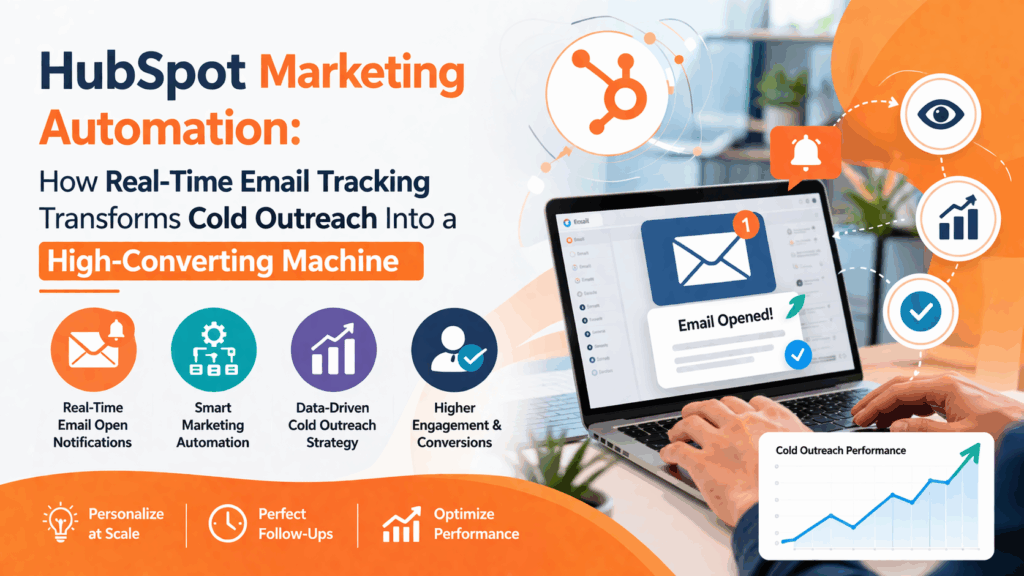
HubSpot Marketing Automation: How Real-Time Email Tracking Transforms Cold Outreach Into a High-Converting Machine
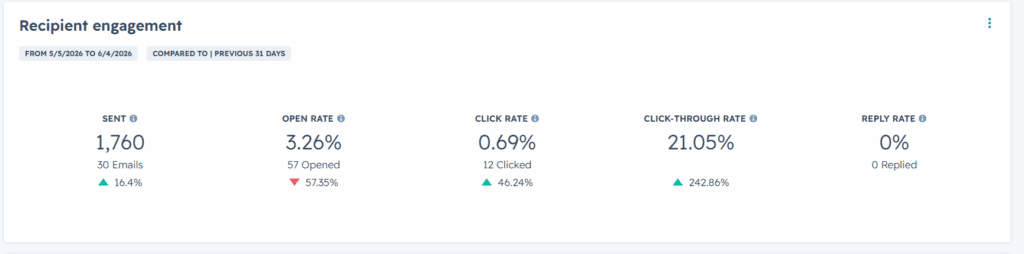
When it comes to hubspot marketing automation, one feature stands out as a true game changer—real-time email tracking and notifications. This powerful capability inside HubSpot allows businesses to see exactly when a prospect opens an email, clicks a link, or engages with content—turning cold outreach into a precise, data-driven strategy.
What Is HubSpot Marketing Automation Email Tracking?
At the core of hubspot marketing automation is its ability to provide instant insights into recipient behavior. Once you send an email through HubSpot, you can track:
- Email opens (including multiple opens)
- Link clicks (which link and when)
- Engagement timeline
- Device and approximate location data
The moment a prospect interacts with your email, you receive a real-time notification, enabling immediate action.
🚀 Why HubSpot Marketing Automation Is Powerful for Cold Outreach
Cold outreach often fails due to poor timing and lack of personalization. HubSpot marketing automation solves both problems effectively.
⏱ Perfect Timing for Follow-Ups
Instead of random follow-ups, you can act when interest is highest.
Example:
If a lead opens your email at 11:00 AM, you can follow up within minutes while your message is still fresh.
👉 This increases reply rates significantly.
🔥 Identify High-Intent Leads
With hubspot marketing automation, you can clearly segment your audience:
- Hot Leads → Multiple opens + link clicks
- Warm Leads → Single open
- Cold Leads → No activity
This allows you to:
- Focus on prospects ready to convert
- Optimize time and effort
🎯 Personalization at Scale
Using engagement data, you can craft smarter follow-ups:
- “I noticed you checked our service page…”
- “Just following up on my previous email…”
This creates a human touch, even in automated campaigns.
📊 Data-Driven Campaign Optimization
One of the biggest advantages of hubspot marketing automation is continuous improvement through data.
You can analyze:
- Best-performing subject lines
- Ideal sending times
- Most-clicked links
Over time, this helps you:
- Increase open rates
- Improve click-through rates
- Maximize conversions
🔗 CRM Integration for Full Funnel Visibility
Since HubSpot combines automation with CRM:
- Every email interaction is logged
- You can track the full customer journey
- Sales and marketing stay aligned
From:
Email Sent → Opened → Clicked → Follow-Up → Conversion
This creates a complete, scalable outreach system.
📈 How to Use HubSpot Marketing Automation for Cold Outreach Success
Here’s a simple but powerful workflow:
- Send a personalized cold email
- Track opens and clicks in real time
- Follow up immediately based on behavior
- Move engaged leads into your sales pipeline
- Automate sequences for nurturing
👉 This turns cold outreach into a predictable lead generation engine.
⚠️ Best Practices for Using HubSpot Marketing Automation
To get the best results:
- Avoid sounding intrusive (“I saw you opened…” directly)
- Focus on value-driven messaging
- Use clear and compelling CTAs
- Stay compliant with email regulations
💡 Final Thoughts
HubSpot marketing automation is not just about sending emails—it’s about understanding behavior and acting at the right moment.
With real-time email tracking, you move from:
❌ Guesswork
➡️ To
✅ Smart, timely, and personalized outreach
If used correctly, this feature alone can dramatically improve your cold email performance and help you close more deals with less effort.
❓ Frequently Asked Questions (FAQ)
1. What is HubSpot marketing automation?
HubSpot marketing automation is a system that automates marketing tasks like email campaigns, lead nurturing, and customer tracking.
2. Is HubSpot CRM really free?
Yes, HubSpot offers a free CRM with essential features. Paid plans unlock advanced capabilities.
3. Is HubSpot good for small businesses?
Absolutely. HubSpot is one of the best CRM tools for small businesses due to its ease of use and scalability.
4. How does HubSpot compare to Salesforce?
HubSpot is simpler and more affordable, while Salesforce is more powerful but complex.
5. Can HubSpot replace multiple tools?
Yes, HubSpot can replace tools like email marketing software, CRM, and automation platforms.
6. Does HubSpot help generate leads?
Yes, HubSpot provides tools for lead capture, nurturing, and conversion.
7. Is HubSpot worth the investment?
For most businesses, yes — especially if you want an all-in-one solution.
Conclusion: Is HubSpot Marketing Automation Worth It?
If you’re serious about growing your business in 2026 and beyond, investing in HubSpot marketing automation is one of the smartest decisions you can make.
It’s not just a tool — it’s a complete growth system.
For small business owners, the combination of:
- Free CRM
- Powerful automation
- Easy usability
- Scalable pricing
makes HubSpot one of the best platforms available today.
ALSO READ:
The Roofer’s Blueprint to Dominating Local Search: Mastering Google PPC Ads, Call & GMB Ads
How Google Business Advertising Helped a Burlington Locksmith Generate Massive Leads in 2025
Final Takeaway
👉 If you want more leads, better conversions, and automated growth, HubSpot is your go-to solution. Ready to take your business to the next level? Don’t wait for customers to find you—let a certified Google Ads expert create a tailored advertising strategy that drives calls, bookings, and real results. Click the button below to book your appointment now and start generating high-quality leads today!

Leave a Reply