



Metricool Tutorial: The Complete Guide for Beginners
Managing social media can quickly become complicated. metricool tutorial
You may have to create content for Instagram, Facebook, LinkedIn, TikTok, YouTube, Pinterest, X, and other platforms. Then you need to schedule posts, monitor engagement, respond to comments, analyze performance, prepare client reports, track competitors, and determine which content is actually producing results.
If you manage multiple brands or work as a social media manager, switching between different dashboards can consume a significant amount of time.
This is where Metricool can help.
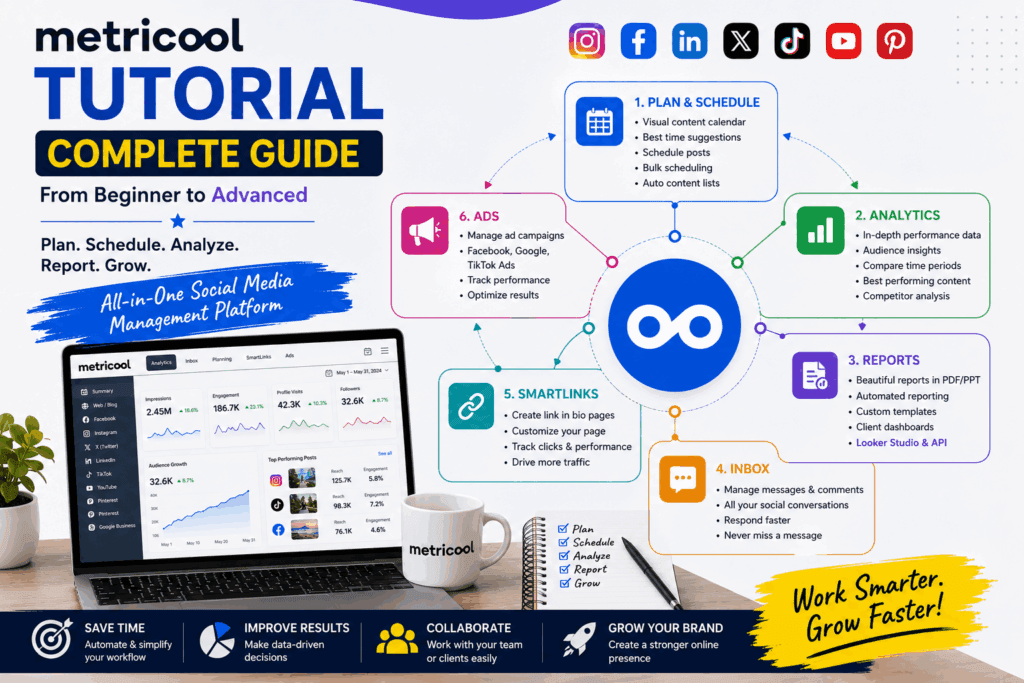
Metricool is an all-in-one social media management and analytics platform designed to bring content planning, publishing, analytics, reporting, inbox management, SmartLinks, campaigns, and other marketing workflows into one workspace. Metricool’s current platform includes tools such as Planner, Analytics, Reporting, Inbox, SmartLinks, and Ads.
In this comprehensive Metricool tutorial, you’ll learn how to get started, connect your social accounts, schedule content, analyze performance, create reports, manage messages, use SmartLinks, monitor competitors, and build a more efficient social media workflow. metricool tutorial
Whether you’re a beginner, content creator, freelancer, social media manager, agency owner, or business owner, this guide will help you understand how to use Metricool effectively.
What Is Metricool?
Metricool is a social media management platform that allows you to manage multiple aspects of your digital presence from one dashboard.
Instead of using one application for scheduling, another for analytics, another for reports, and another for managing social media messages, Metricool brings many of these functions together.
Its major areas currently include:
- Planning
- Analytics
- Reporting
- Inbox
- SmartLinks
- Ads
- Competitor analysis
- AI-assisted content creation
- Team and client management on applicable plans
- Integrations and automation
- metricool tutorial
Metricool’s Help Center describes the platform as being organized around six major areas: Analytics, Reporting, Inbox, Planning, SmartLinks, and Ads.
This makes Metricool particularly useful for people who need to manage social media systematically rather than publishing posts manually one platform at a time.
Why Should You Use Metricool?
Imagine you manage five social media platforms. metricool tutorial
Without a centralized tool, your workflow could look something like this:
Create content → Open Instagram → Publish → Open Facebook → Publish → Open LinkedIn → Publish → Open TikTok → Schedule → Check analytics → Create spreadsheet → Prepare client report
This process can become repetitive.
With Metricool, much of the workflow can be organized from one platform.
You can plan content through the calendar, schedule posts, review performance, analyze competitors, manage conversations, create reports, and monitor other marketing activities.
The real benefit isn’t simply having more features.
The benefit is reducing the amount of time you spend switching between tools.
Metricool Tutorial: How to Get Started
Let’s go through the setup process step by step.
Step 1: Create Your Metricool Account
The first step is to create a Metricool account.
Metricool currently offers a Free plan, so beginners can start without immediately committing to a paid subscription.
After creating your account, you’ll arrive at your main dashboard. metricool tutorial
The interface is organized around different areas of your social media workflow.
Before scheduling content, however, you need to connect your social profiles.
Step 2: Create or Select a Brand
Metricool uses the concept of a Brand to organize your social media profiles and associated data.
For example, suppose you’re managing a company called: metricool tutorial
ABC Digital Marketing
You could create a Brand for that business and connect its social profiles.
A Brand can contain the relevant social channels and marketing data for that business.
If you’re a freelancer managing multiple clients, you can organize each client’s presence separately depending on your plan.
This is especially helpful for agencies and social media managers.
Step 3: Connect Your Social Media Accounts
Once your Brand is created, connect the social networks you want to manage.
Depending on the platform and Metricool plan, available connections can include networks such as:
- TikTok
- YouTube
- X
- Threads
- Twitch
- Google Business Profile
- Other supported channels
- metricool tutorial
The exact availability and capabilities can change by network and subscription plan.
Metricool’s current Free plan, for example, supports one Brand and excludes LinkedIn and X/Twitter connections, while paid plans expand the available capabilities.
When connecting an account, follow the authorization instructions provided by the social network.
Make sure you’re using the correct business or creator account when required.
Step 4: Understand the Metricool Dashboard
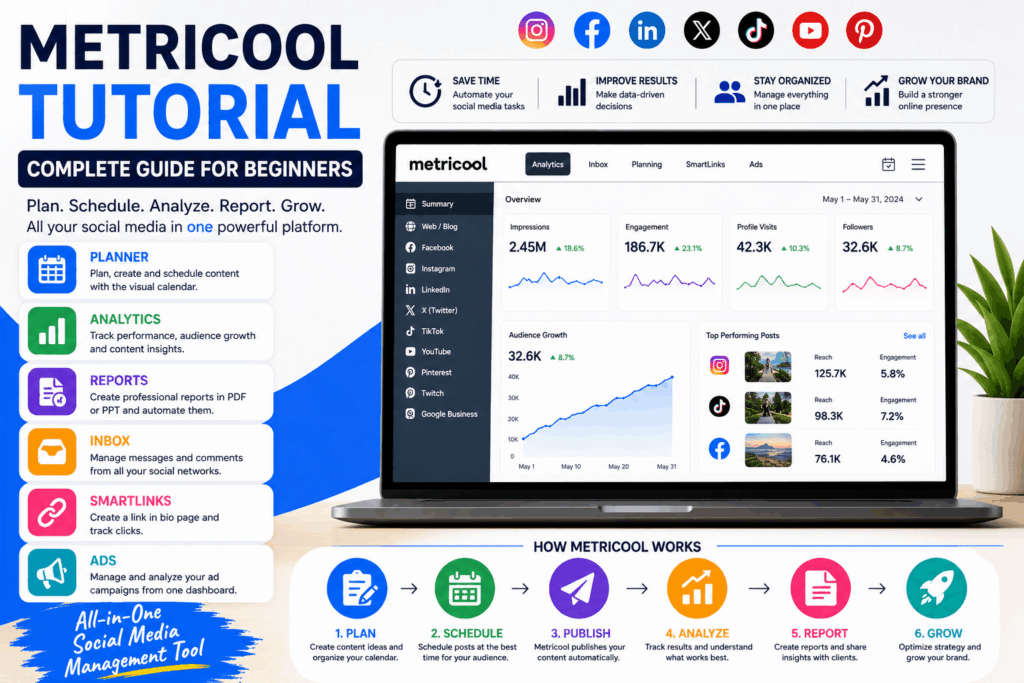
Once your accounts are connected, spend some time understanding the main navigation. metricool tutorial
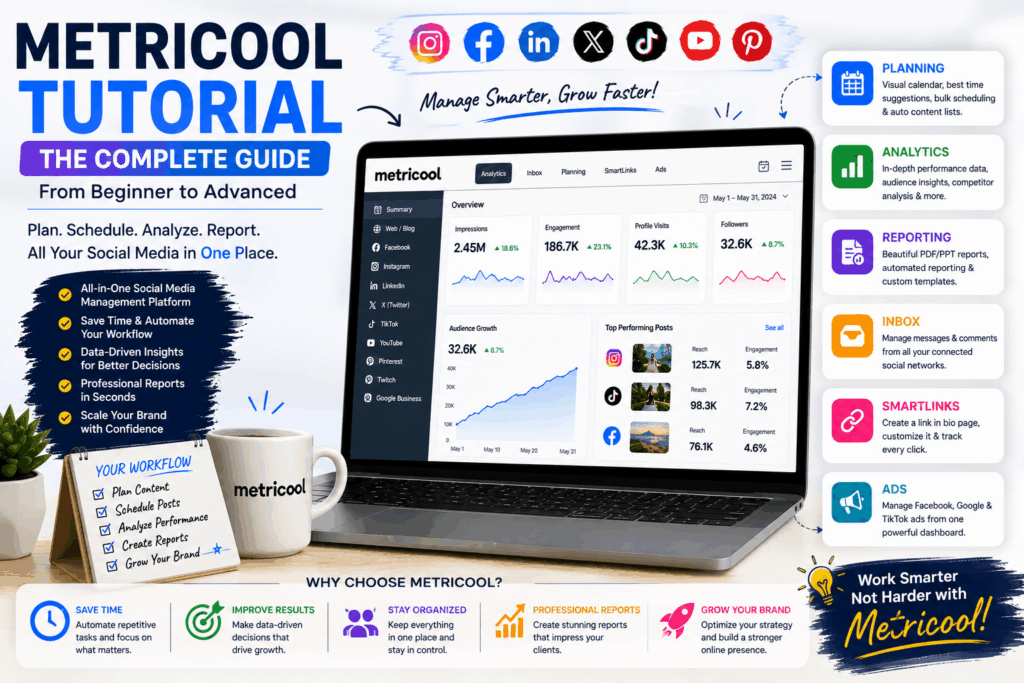
Metricool currently organizes its main functionality into several major sections.
Planning
Used to create and schedule social media content.
Analytics
Used to understand social media performance and audience metrics.
Reporting
Used to create downloadable and automated reports.
Inbox
Used to manage comments and messages from connected networks.
SmartLinks
Used to create customizable link-in-bio pages and track clicks.
Ads
Used to manage supported advertising campaigns.
Understanding this structure will make the rest of the Metricool workflow much easier.
Metricool Planning Tutorial
One of Metricool’s most useful features is its content planner. metricool tutorial
Instead of publishing posts individually, you can build a content calendar and schedule your content ahead of time.
Metricool’s Planner supports different content formats and includes features such as best-time recommendations, previews, automatic content lists, bulk planning, and integrations with tools such as Canva and Google Drive on applicable plans.
Let’s understand how it works.
Step 5: Open the Planning Calendar
Go to the Planning section.
You’ll see your social media calendar. metricool tutorial
The calendar gives you a visual overview of your upcoming content.
Depending on your workflow, you can view:
- Scheduled posts
- Drafts
- Published content
- Content by network
- Different dates
- Different content types
This makes it easier to identify gaps in your publishing schedule. metricool tutorial
Step 6: Create Your First Social Media Post
To create a post:
- Open Planning.
- Select the appropriate date.
- Click the option to create a post.
- Select the social network.
- Add your caption.
- Upload your image or video.
- Add links or other supported elements.
- Review the preview.
- Select the publishing time.
- Schedule the post.
- metricool tutorial
Metricool’s current Help Center confirms that content can be scheduled directly from the calendar, with additional options such as automatic lists and CSV-based batch scheduling.
Step 7: Customize Posts for Each Platform
One important social media strategy is avoiding exactly the same content everywhere. metricool tutorial
A LinkedIn post doesn’t necessarily need the same caption as an Instagram post.
Similarly, TikTok, Facebook, and YouTube have different audience expectations.
Metricool allows you to adapt content for different social networks.
For example:
Use:
- Short engaging captions
- Visual content
- Relevant hashtags
- Strong hooks
- Calls to action
Focus more on:
- Professional insights
- Industry information
- Case studies
- Business lessons
- Thought leadership
Use:
- Community-focused content
- Questions
- Stories
- Videos
- Educational posts
- metricool tutorial
TikTok
Focus on:
- Short-form video
- Strong opening hooks
- Trends
- Educational entertainment
- Fast-paced storytelling
The ability to manage the workflow centrally while adapting content for each network can make your publishing process more efficient.
Step 8: Use the Best Time to Post Feature
Timing can influence how quickly your audience sees and interacts with your content.
Metricool provides best-time recommendations based on audience activity and platform data.
Instead of randomly selecting a time, you can use these recommendations as a starting point.
However, don’t treat “best time” as a guarantee.
Your actual results depend on:
- Audience behavior
- Content quality
- Topic
- Platform
- Competition
- Geography
- Account size
- Audience interests
- metricool.com/
The best strategy is to use recommended times and then validate them using your own performance data.
Step 9: Use Automatic Content Lists
If you regularly publish evergreen content, automatic content lists can help reduce repetitive scheduling work.
For example, suppose you have 100 educational posts. metricool tutorial
Instead of manually scheduling each one, you can organize them into categories and use an automated content list to recycle selected content according to your strategy.
This is especially useful for:
- Quotes
- Evergreen tips
- Blog posts
- Educational resources
- Product information
- Industry facts
- Promotional reminders
Be careful not to overuse repetitive content. metricool tutorial
Your audience should still receive fresh and relevant material.
Step 10: Bulk Schedule Content
If you already have a large content library, manually entering every post can be time-consuming.
Metricool supports CSV-based batch scheduling, allowing you to prepare multiple posts and import them into the planner.
This can be particularly useful for social media managers preparing an entire month’s content.
A typical workflow could be: metricool tutorial
Content ideas → Spreadsheet → Review → CSV → Import → Calendar → Final approval → Publishing
This can dramatically simplify large-scale content planning.
Metricool Analytics Tutorial
Publishing content is only half of social media marketing.
The other half is understanding performance.
Metricool’s Analytics section lets you explore performance data for connected profiles.
According to Metricool’s current documentation, you can select a network or Summary view, choose a reporting period, examine metric cards, charts, lists, and compare periods. metricool tutorial
Step 11: Open Analytics
Go to:
Analytics → Select your network
You can typically choose a specific platform or a summary view.
The exact metrics available depend on the network.
For example, Instagram analytics may include information related to:
metricool tutorial
- Followers
- Reach
- Views
- Engagement
- Interactions
- Posts
- Reels
- Audience
- Content performance
Different platforms expose different metrics.
Step 12: Understand the Most Important Social Media Metrics
Numbers are only useful when you understand what they mean.
Here are some important metrics to monitor. metricool tutorial
Reach
Reach represents the number of unique users who saw your content, depending on the platform’s definition.
High reach means your content is getting visibility.
But reach alone doesn’t necessarily mean success.
Impressions or Views
These indicate how frequently content was displayed or viewed, depending on the platform.
A user may see the same content more than once, so impressions and reach are not necessarily identical.
Engagement
Engagement can include actions such as:
- Likes
- Comments
- Shares
- Saves
- Clicks
- Other interactions
High engagement can indicate that your content resonates with your audience.
Engagement Rate
Engagement rate helps you understand engagement relative to another measure, such as reach or followers, depending on the platform and calculation method. metricool tutorial
This is often more informative than looking only at raw likes.
Follower Growth
Track:
Starting followers → New followers → Unfollows → Ending followers
This can help you understand whether your content strategy is attracting the right audience.
Step 13: Compare Different Time Periods
One of the most useful ways to analyze performance is through comparison.
For example:
July vs August
or:
Last 30 days vs previous 30 days
You can ask:
- Did reach increase?
- Did engagement improve?
- Did followers grow?
- Which content performed better?
- Did website clicks increase?
- Did video views change?
- metricool tutorial
Metricool’s Analytics interface supports period selection and comparison views for performance analysis.
Step 14: Identify Your Best-Performing Content
Don’t just look at account-level numbers.
Look at individual posts.
Ask:
Which posts generated the highest engagement?
Then investigate what those posts had in common. metricool tutorial
Maybe your audience responds well to:
- Tutorials
- Reels
- Carousels
- Case studies
- Before-and-after content
- Industry statistics
- Educational posts
- Personal stories
Once you discover patterns, create more content around those successful themes.
Metricool Competitor Analysis Tutorial
Competitor analysis is another valuable feature.
Instead of analyzing your account in isolation, compare your performance with relevant competitors. metricool tutorial
You may want to study:
- Posting frequency
- Content types
- Engagement
- Audience growth
- Popular posts
- Hashtags
- Publishing patterns
The purpose isn’t to copy competitors.
The purpose is to identify opportunities.
For example, suppose your competitor posts:
“5 Canva Tips for Beginners”
and receives strong engagement. metricool tutorial
You could create a better and more detailed version:
“15 Canva Design Tips Every Social Media Manager Should Know”
The goal is to use competitive insights to improve your own content strategy.
Metricool Reporting Tutorial
If you manage social media for clients, reporting can consume a significant amount of time. metricool tutorial
Metricool includes a dedicated Reporting area for creating reports and dashboards.
Depending on your plan, Metricool supports downloadable PDF and PowerPoint reports, automated reports, customizable report templates, campaign dashboards, and Looker Studio connectivity.
Step 15: Create a Social Media Report
A professional monthly report can include:
Executive Summary
Explain the most important results.
Audience Growth
Show follower changes.
Reach
Explain visibility.
Engagement
Highlight interactions.
Top Content
Show the best-performing posts.
Traffic
Report website or link activity where available.
Recommendations
Explain what should happen next month.
A report shouldn’t simply contain screenshots of numbers.
It should answer:
What happened?
Why did it happen?
What should we do next?
That turns analytics into strategy.
metricool tutorial
Step 16: Automate Client Reports
If you’re a social media manager, automated reporting can save time.
Instead of manually creating every report at the end of each month, you can configure automated reporting where supported by your plan.
Metricool’s current paid plans include automated reporting, while more advanced plans add customizable report templates and other reporting capabilities.
This can be especially useful when managing multiple clients. metricool tutorial
Metricool Inbox Tutorial
Social media management isn’t just about publishing.
You also need to respond to people.
Metricool’s Inbox brings messages and comments from supported networks into one place.
This can help you:
- Monitor conversations
- Respond to comments
- Answer questions
- Track customer inquiries
- Manage community interactions
- Avoid missing messages
- metricool tutorial
Metricool describes Inbox as a centralized place for messages and comments from connected networks.
Step 17: Build a Faster Community Management Workflow
A simple workflow is:
Check Inbox → Prioritize messages → Respond → Escalate important questions → Record recurring issues
For businesses, this can help turn social media engagement into customer service. metricool tutorial
For example, someone may comment:
“How much does your service cost?”
Instead of ignoring the comment, you can respond with useful information and direct the person to the appropriate page.
Metricool SmartLinks Tutorial
Many social networks give users limited opportunities to place links in their profiles.
SmartLinks can help solve this problem.
Metricool SmartLinks allows you to create a customizable landing page containing multiple links.
You can use it for:
- Website links
- Blog posts
- YouTube videos
- Products
- Services
- Lead magnets
- Contact pages
- Campaigns
- metricool tutorial
Metricool states that SmartLinks can be customized and used to track clicks, while allowing you to update destinations without changing the main bio link.
Step 18: Create Your SmartLinks Page
A basic SmartLinks strategy might look like:
Your Name
Social Media Manager & Digital Marketer
Featured Links
- My Website
- Latest YouTube Video
- Free Marketing Guide
- Book a Consultation
- My Services
- Contact Me
This turns your social media profile into a simple traffic hub.
Metricool Ads Tutorial
Metricool also provides advertising management functionality.
The current platform describes unified ad campaign management for supported Google, Facebook, and TikTok advertising workflows.
The advantage is having advertising information closer to your organic social media data. metricool tutorial:
You can potentially evaluate:
- Organic content
- Paid campaigns
- Traffic
- Engagement
- Conversions
- Campaign performance
This can help you understand the bigger picture.
Step 19: Don’t Confuse Organic and Paid Results
When analyzing marketing performance, separate organic and paid activity.
For example:
Organic Reach = 50,000
Paid Reach = 150,000
Total visibility may be 200,000, but the strategies producing those numbers are very different.
This distinction is important when deciding where to invest your time and budget.
Metricool AI Features: metricool tutorial
Metricool also includes AI-assisted capabilities.
Its current Planner promotes an AI social media assistant that can help generate ideas and content, while the pricing page indicates AI assistant credits vary by plan.
AI can be useful for:
- Brainstorming topics
- Generating caption drafts
- Creating hooks
- Rewriting content
- Adjusting tone
- Creating variations
- Improving calls to action
But don’t publish AI-generated content without reviewing it.
Your content should still sound like your brand. metricool tutorial
Metricool + Canva Workflow
If you’re already using Canva for graphic design, the integration can make your workflow more convenient.
A practical process can be:
Canva → Design → Metricool → Schedule → Publish → Analyze
Instead of repeatedly downloading and uploading files, integrations can reduce unnecessary steps.
Metricool’s current Starter and higher plans include Canva and Google Drive integrations.
Metricool Mobile App
Social media management doesn’t always happen at your desk.
The Metricool ecosystem also includes a mobile app.
This can be useful when you need to:
- Check analytics
- Review content
- Monitor activity
- Manage your social workflow while away from your computer
- metricool tutorial
The exact functionality can vary between mobile and web versions, so use the desktop platform when you need the full management experience.
Metricool Pricing: Is There a Free Plan?
Yes.
Metricool currently offers a Free plan alongside paid options.
According to its current pricing information, the Free plan is priced at $0/month and supports one Brand, up to 20 scheduled posts per month, competitor analysis for up to five profiles, and 30 days of analytics, with feature restrictions including no LinkedIn or X/Twitter connection on the Free plan. metricool tutorial
Paid plans currently include Starter, Advanced, and Custom, with the exact pricing and included capabilities depending on billing currency, brand count, and selected options.
Because pricing and feature limits can change, always check Metricool’s current pricing page before purchasing a subscription.
Metricool Free vs Paid: Which Should You Choose?
Choose Free If: metricool tutorial
metricool tutorial
- You’re just learning social media management.
- You manage one Brand.
- You publish a limited amount of content.
- You want to test the platform.
- You don’t need advanced reporting.
Consider Starter If:
- You manage more content.
- You need more Brands.
- You want unlimited publishing subject to applicable fair-use limits.
- You need expanded analytics history.
- You want LinkedIn connectivity.
- You need PDF or PPT reports.
- You want integrations such as Canva and Google Drive.
Consider Advanced If:
- You’re managing clients.
- You need team collaboration.
- You want role management.
- You need approval workflows.
- You need customizable reports.
- You want Looker Studio or API access
- metricool tutorial.
The current plan structure supports these distinctions, with Advanced adding team/client management, role management, post approval, customizable report templates, Looker Studio, and API capabilities. metricool tutorial
Pros and Cons of Metricool
Pros of Metricool
1. All-in-One Social Media Management
Metricool combines scheduling, analytics, reporting, inbox management, SmartLinks, and advertising features in one platform.
2. Easy Content Planning
The visual calendar makes it easier to organize your publishing schedule.
3. Strong Analytics
You can examine performance data across supported social networks and compare periods.
4. Useful Reporting
Automated and downloadable reporting can be especially valuable for freelancers and agencies.
5. Competitor Analysis
You can compare relevant competitor profiles and identify content opportunities.
6. SmartLinks
The link-in-bio feature provides another way to direct social traffic toward important destinations.
7. Automation
Automatic lists, recurring content, bulk scheduling, and reporting can reduce repetitive work.
8. Free Plan
Beginners can test Metricool without immediately paying for a subscription.
9. Team Features
Higher plans provide features designed for agencies and teams, including roles and approval workflows.
10. Integrations
Depending on the plan, Metricool supports integrations such as Canva, Google Drive, Looker Studio, Zapier, and API functionality.
Cons of Metricool
1. Free Plan Has Limits
The Free plan is useful for learning, but serious multi-brand workflows may require a paid plan.
2. Features Depend on Subscription
Some advanced reporting, analytics, team, integration, and network capabilities are restricted to higher plans.
3. Social Networks Have Different Limitations
Not every platform provides identical publishing or analytics capabilities.
4. Learning Curve
Metricool has many features, so beginners may need some time to understand the entire platform.
5. Advanced Features Can Increase Cost
If you need multiple brands or add-ons, the overall subscription cost can increase.
6. Analytics Depend on Platform APIs
Social media platforms control which data third-party tools can access, so available metrics can change.
7. Automation Still Requires Strategy
Scheduling hundreds of posts doesn’t automatically create a successful social media strategy.
You still need good content.
Who Should Use Metricool?
Metricool can be useful for several types of users.
Social Media Managers
If you’re responsible for multiple client accounts, centralized planning and reporting can save significant time.
Freelancers
Freelancers can use Metricool to manage their own brand and client projects.
Agencies
Agencies can benefit from team management, approval workflows, reporting, and multi-brand capabilities on appropriate plans.
Content Creators
Creators can schedule content, monitor performance, and understand which topics generate engagement.
Small Businesses
Businesses can use Metricool to organize social media publishing without needing a large marketing team.
Marketing Professionals
Marketing teams can combine content planning, analytics, reporting, and campaign management into a broader workflow.
A Practical Metricool Workflow for Social Media Managers
Here’s a simple workflow you can follow every month.
Week 1: Research
Identify:
- Audience questions
- Competitor content
- Trending topics
- Previous high-performing content
- Business goals
Week 2: Content Creation: metricool tutorial
Create:
- Images
- Reels
- Videos
- Carousels
- Blog posts
- Educational content
Week 3: Scheduling
Upload your content to Metricool.
Create captions.
Customize each platform.
Schedule the posts.
Week 4: Analysis
Review:
- Reach
- Engagement
- Follower growth
- Top content
- Website clicks
- Video performance
- metricool tutorial
Then use those insights to create the next month’s content.
This creates a continuous cycle:
Research → Create → Schedule → Publish → Analyze → Improve
How to Use Metricool for Client Management
If you are a social media manager, don’t just use Metricool as a publishing tool. metricool tutorial
Use it as a strategic client-management system.
For every client, define:
Business Goal
For example:
Generate leads
Social Media Goal
For example:
Increase qualified website traffic
Content Goal
For example:
Publish three educational posts every week
KPI
For example:
Increase website clicks by 20%
Then track the relevant metrics. metricool tutorial
This approach ensures you’re not simply reporting vanity metrics.
Metricool Best Practices
Here are some practical tips for getting more value from Metricool.
1. Plan Before Scheduling
Don’t open the calendar without a content strategy.
2. Use Content Pillars
Create 3–5 major content categories.
For example:
- Educational
- Promotional
- Inspirational
- Behind the scenes
- Case studies
- metricool tutorial
3. Analyze Every Month
Don’t schedule content and forget about it.
Review performance regularly.
4. Repurpose Your Best Content
If a post performs exceptionally well, create additional versions of the same concept.
5. Customize for Each Platform
Don’t blindly duplicate captions everywhere.
6. Use Data to Make Decisions
Let performance data influence your strategy.
7. Keep Your Calendar Organized
Use categories, labels, or other organizational methods available to your workflow.
8. Automate Repetitive Tasks
Use recurring content and bulk scheduling where appropriate.
9. Review Before Publishing
Always check:
- Spelling
- Links
- Images
- Mentions
- Hashtags
- Platform formatting
- Calls to action
10. Don’t Automate Everything
Human interaction remains important.
Social media is about relationships, not just scheduling.
Common Metricool Mistakes to Avoid
Mistake 1: Scheduling Without a Strategy
A full calendar doesn’t necessarily mean a successful strategy.
Mistake 2: Measuring Only Followers
Follower count is important, but it doesn’t tell the whole story.
Also monitor:
- Engagement
- Reach
- Clicks
- Leads
- Conversions
- Content performance
Mistake 3: Ignoring Negative Performance
Poor-performing content is useful information.
Find out why it failed.
Mistake 4: Copying Competitors
Competitor analysis should inspire ideas—not encourage direct copying.
Mistake 5: Posting the Same Message Everywhere
Adapt your content for the platform and audience.
Mistake 6: Ignoring Comments and Messages
Social media management includes community management.
Mistake 7: Creating Reports Without Recommendations
Clients don’t just need numbers.
They need to know what those numbers mean.
How to Create a Monthly Social Media Strategy Using Metricool
Here’s a simple example.
Suppose you’re managing a digital marketing agency.
Your monthly strategy could be:
Goal
Generate qualified leads.
Content Pillar 1
Digital marketing education.
Content Pillar 2
Client case studies.
Content Pillar 3
Industry trends.
Content Pillar 4
Service promotion.
Content Pillar 5
Founder/personal-brand content.
Then create:
12 educational posts
8 short-form videos
4 case studies
4 promotional posts
4 personal-brand posts
Total:
32 pieces of content
Load them into Metricool’s planner, customize each post, and schedule them throughout the month.
At the end of the month, analyze which categories generated the strongest results.
Then adjust the next month’s content mix.
Metricool Tutorial: What Should You Track?
The answer depends on your objective.
If your objective is brand awareness, track:
- Reach
- Views
- Impressions
- Follower growth
If your objective is engagement, track:
- Comments
- Shares
- Saves
- Engagement rate
- Interactions
If your objective is website traffic, track:
- Link clicks
- Website sessions
- Referral traffic
- Campaign performance
If your objective is lead generation, track:
- Landing-page traffic
- Leads
- Conversion rate
- Cost per lead
If your objective is sales, track:
- Conversions
- Revenue
- Customer acquisition cost
- Return on ad spend
The important principle is:
Track metrics that connect directly to your business objective.
Is Metricool Worth It?
Metricool can be worth considering if you want to consolidate social media management into one platform.
Its value becomes more apparent when your workflow includes multiple social networks, frequent publishing, analytics, client reporting, or team collaboration.
For a beginner managing one account, the Free plan may be enough to learn the basics.
For freelancers and agencies, paid plans may become more valuable as the number of brands, posts, reports, clients, and collaboration requirements grows.
The best way to evaluate it is to compare the time saved against the subscription cost.
If a tool saves you several hours every month and improves your reporting and workflow, the investment may make sense.
Final Thoughts
Metricool is more than a social media scheduling tool.
It can serve as a central workspace for planning, publishing, analytics, reporting, community management, SmartLinks, advertising, and social media optimization.
The most effective way to use Metricool is not to focus on every feature at once.
Start with the fundamentals:
Connect your accounts → Plan your content → Schedule posts → Monitor performance → Analyze results → Improve your strategy.
Once you’re comfortable with the basics, add advanced features such as competitor analysis, automated reporting, SmartLinks, bulk scheduling, team workflows, and campaign management.
Remember that Metricool is a tool—not a social media strategy by itself.
The platform can help you organize and measure your work, but your results will ultimately depend on the quality of your content, audience understanding, consistency, creativity, and ability to turn data into better decisions.
If you use Metricool as part of a strategic workflow rather than simply as a scheduling calendar, it can become a powerful component of your social media management system.
Frequently Asked Questions About Metricool
1. What is Metricool used for?
Metricool is used for social media planning, scheduling, analytics, reporting, inbox management, SmartLinks, competitor analysis, and supported advertising workflows.
2. Is Metricool free?
Yes. Metricool currently offers a Free plan. The Free plan has limitations on brands, scheduling, analytics history, and certain social-network connections.
3. Is Metricool good for beginners?
Yes. Beginners can start with the Free plan and learn the basic workflow of connecting accounts, scheduling content, and reviewing analytics.
4. Can Metricool schedule Instagram posts?
Yes, Metricool supports Instagram publishing and scheduling, subject to the capabilities and requirements of the Instagram connection and the specific content type.
5. Can Metricool schedule Facebook posts?
Yes. Facebook is among the supported social networks in Metricool’s social media management ecosystem.
6. Can Metricool schedule LinkedIn posts?
LinkedIn functionality is available on applicable paid plans. The current Free plan excludes LinkedIn connections.
7. Can I schedule TikTok content with Metricool?
Metricool supports TikTok as part of its social media management ecosystem, although available publishing features can depend on TikTok’s requirements and the type of content.
8. Can Metricool analyze competitors?
Yes. Competitor analysis is available, with the number of competitor profiles depending on your subscription plan. The Free plan currently allows analysis of up to five competitor profiles.
9. Can Metricool create social media reports?
Yes. Metricool provides reporting features, including downloadable reports and automated reporting on applicable plans. Higher plans add customizable report templates and other advanced reporting capabilities.
10. Can Metricool manage social media messages?
Yes. Metricool includes an Inbox for managing supported social media messages and comments from one location.
11. Does Metricool have an AI tool?
Yes. Metricool currently provides an AI social media assistant for content-related tasks, with usage and credits depending on the plan.
12. Does Metricool integrate with Canva?
Yes. Canva integration is available on applicable plans, including current Starter and higher plans.
13. Can I use Metricool for multiple clients?
Yes. Metricool supports multi-brand workflows, with the number of brands and client/team features depending on the subscription plan. Advanced plans add features such as team and client management, roles, and post approval.
14. Is Metricool good for social media agencies?
It can be particularly useful for agencies because of multi-brand management, reporting, collaboration, approval workflows, and client-management features available on higher plans.
15. How often should I check Metricool analytics?
For most businesses, checking key metrics weekly and conducting a deeper monthly analysis is a practical starting point. High-volume campaigns may require more frequent monitoring.
16. What is the most important Metricool feature?
There isn’t one universal answer. For a social media manager, Planner and Reporting may be especially valuable. For a content creator, Analytics may be more important. For an agency, multi-brand management and reporting may provide the greatest value.
Metricool Tutorial: Quick Start Checklist
Day 1
- Create your Metricool account.
- Create your Brand.
- Connect your social profiles.
- Explore the dashboard.
Day 2
- Review Analytics.
- Identify your best-performing content.
- Study competitor profiles.
- Define your content pillars.
Day 3
- Create a content calendar.
- Prepare your captions.
- Upload your creative assets.
- Schedule your first posts.
Day 4
- Create or configure SmartLinks.
- Review your profile links.
- Set up relevant tracking.
Day 5
- Explore Inbox.
- Create saved replies where useful.
- Establish a community-management routine.
Day 6
- Explore Reporting.
- Build a basic monthly report.
- Decide which KPIs matter to your business.
Day 7
- Review your complete workflow.
- Identify repetitive tasks.
- Automate appropriate activities.
- Create next month’s content plan.
After one week, you should have a solid understanding of the Metricool interface and the basic workflow.
Then the real work begins: creating better content, understanding your audience, analyzing your results, and continuously improving your strategy.
Read this also:
Systeme.io Affiliate Marketing: The Complete Guide to Building a Profitable Affiliate Business
Final Takeaway
The best way to learn Metricool is by actually using it.
Start small.
Connect one Brand.
Schedule a few posts.
Review your analytics.
Create a report.
Study what worked.
Then expand your workflow.
Metricool can help remove much of the operational complexity from social media management, but the winning formula remains simple:
Plan → Publish → Engage → Measure → Learn → Optimize → Repeat.
That is how you turn social media activity into a measurable marketing system.
