

Introduction: Why Wix Web Builder is Dominating in 2026
In today’s digital-first world, having a website is no longer optional—it’s essential. Whether you run a local salon, dental clinic, restaurant, or consulting business, your website acts as your 24/7 salesperson.
This is where the Wix Web Builder comes into play.
Wix has transformed the website creation process by making it simple, fast, and accessible—even for non-technical users. Unlike traditional platforms that require coding or expensive developers, Wix empowers business owners to build stunning websites in hours.
In this comprehensive guide, we’ll cover:
- What Wix Web Builder is
- Benefits for local and small businesses
- Wix Website Maker features
- Wix vs WordPress comparison
- Pros and cons of Wix
- SEO strategies
- FAQs
What is Wix Web Builder?
Wix Web Builder is a cloud-based platform that allows users to create professional websites using drag-and-drop tools.
It eliminates the need for:
- Coding knowledge
- Technical setup
- Hosting management
With Wix, everything is integrated into one platform, including:
- Website design
- Hosting
- SEO tools
- Marketing automation
Key Features of Wix Website Maker
1. Drag-and-Drop Editor
The Wix Web Builder is famous for its total creative freedom. Unlike restrictive, grid-locked alternatives, this pixel-perfect editor allows you to click and position any element—be it text, images, videos, or buttons—exactly where you want it on the screen. It is an entirely visual process requiring zero coding knowledge, making web design accessible to absolute beginners while remaining powerful enough for seasoned creators.
2. 800+ Designer Templates
You do not have to start from scratch. The Wix Web Builder provides a massive library of over 800 professionally designed, high-quality templates tailored to various industries. Whether you are launching a portfolio or a business site, you can find ready-made structures for:
- Restaurants: Complete with menu layouts and reservation designs.
- Real estate: Featuring property showcases and agent profiles.
- Clinics: Equipped with clear service pages and contact forms.
- Agencies: Styled with modern portfolio grids and client testimonial sections.
- E-commerce: Built with optimized product galleries and checkout flows.
3. Wix ADI (Artificial Design Intelligence)
If you are short on time or feeling overwhelmed by choices, the Wix Web Builder offers an AI-driven shortcut. Wix ADI asks you a few simple questions about your business, your stylistic preferences, and the features you need. In just a few minutes, it automatically generates a fully functional, customized website complete with relevant text and imagery that you can then tweak as much as you like.
4. Built-in SEO Tools
A beautiful website is only useful if people can find it. The Wix Web Builder comes equipped with a robust, integrated search engine optimization suite designed to boost your visibility on Google. It streamlines complex technical tasks by providing:
- Meta tags optimization: Easily edit your meta titles and descriptions to attract clicks.
- URL customization: Clean up web addresses to make them user- and search-friendly.
- Sitemap generation: Wix automatically creates and updates your XML sitemap.
- Google indexing: Connect to Google Search Console instantly to get your site listed in seconds.
5. Mobile Optimization
With more than half of global web traffic coming from phones, mobile responsiveness is non-negotiable. The Wix Web Builder automatically generates a mobile-friendly version of your site alongside the desktop layout. You can also use the dedicated mobile editor to customize the smartphone experience specifically—hiding heavy elements or rearranging menus—without altering your desktop design.
6. App Market
Every business has unique operational needs, and the Wix Web Builder expands to meet them via its massive App Market. With both free and premium add-ons, you can effortlessly integrate advanced functionalities with a single click, including:
- Chatbots: For 24/7 automated customer support.
- Booking systems: Allowing clients to schedule appointments and pay online.
- Email marketing: To launch newsletters and nurture leads directly from your dashboard.
- CRM tools: To manage customer relationships, track interactions, and automate workflows.
7. Hosting Included
Setting up a website usually means dealing with third-party domain registrars and web hosts, but the Wix Web Builder provides an all-in-one ecosystem. Secure, cloud-based hosting is built directly into the platform for free. This ensures your website benefits from high-speed loading times, an uptime of 99.9%, and enterprise-grade security—including a free SSL certificate—without you ever having to configure a server.
Why Wix Website Builder is Perfect for Local Businesses
For small and local businesses, success depends on three key factors: getting found online, building trust, and generating consistent leads. This is exactly where the Wix Web Builder becomes a powerful all-in-one solution.
Let’s explore in detail how the Wix Web Builder helps local businesses grow faster without technical headaches.
1. Quick Website Launch (Go Online in Less Than a Day)
The Wix Web Builder allows you to launch your website incredibly fast.
Why this matters:
- Many local businesses delay going online
- Hiring developers takes time and coordination
- You lose potential customers every day you’re not visible
With Wix Web Builder:
- Choose from 800+ professional templates
- Drag-and-drop editor (no coding needed)
- Add content, services, and images instantly
👉 You can build a professional website within a single day.
Best suited for:
- New businesses
- Local service providers
- Freelancers
2. Google Visibility (Get Found by Local Customers)
The Wix Web Builder is designed to help your business appear in search results.
Built-in SEO advantages:
- Easy SEO setup checklist
- Meta title & description editing
- Mobile-friendly design
- Google Search Console integration
You can rank for:
- “Best salon near me”
- “Dentist in your area”
- “Home services near me”
👉 This drives free organic traffic to your business.
3. Integrated Booking, Calls & Lead Generation
The Wix Web Builder acts like a 24/7 sales machine for your business.
Key features:
- Online appointment booking
- Click-to-call buttons
- Contact forms & lead capture
- Chat/WhatsApp integration
Ideal for:
- Salons
- Dentists
- Consultants
- Repair services
Customers can:
- Book instantly
- Call directly
- Send inquiries easily
👉 This improves conversion rates and customer experience.
4. Cost-Effective Solution (Save Big on Development)
Traditional website development can be expensive and ongoing.
Typical cost:
- ₹50,000–₹2,00,000 for a basic site
- Extra charges for updates
With Wix Web Builder:
- Affordable monthly plans
- Hosting included
- No developer required
👉 You save huge upfront and ongoing costs.
5. Professional Branding (Compete with Big Brands)
The Wix Web Builder helps you create a strong and trustworthy brand image.
Features:
- Custom domain (yourbusiness.com)
- Premium templates
- High-quality visuals
- Mobile-optimized layouts
👉 Even small businesses can look premium and professional.
BONUS TIP: No Need to Hire Expensive Developers Again
Here’s one of the biggest hidden advantages of the Wix Web Builder:
👉 You don’t need to hire a website developer again and again.
Why?
- Simple drag-and-drop interface
- Anyone can update content easily
- No coding knowledge required
- Make changes anytime instantly
What you can manage yourself:
- Update services and pricing
- Add new pages
- Upload blogs and images
- Modify design anytime
👉 This gives you:
- Full control over your website
- Faster updates
- Zero dependency on developers
💡 In the long run, this can save you lakhs of rupees and a lot of time.
Digital Growth Platform
The Wix Web Builder is not just a tool—it’s a complete digital growth platform for local businesses.
It helps you:
- Launch quickly
- Get found on Google
- Generate leads automatically
- Save money
- Maintain your website easily
💡 Bottom Line
If you are a local business owner who wants results without technical complexity, the Wix Web Builder is one of the smartest choices available today.
Wix Web Builder: Why It’s a Game-Changer for Small Business Owners
In today’s digital-first world, having a professional website is no longer optional—it’s essential. However, many small business owners face common challenges like limited budgets, lack of technical expertise, and time constraints. This is where Wix comes in as a powerful solution.
The Wix Web Builder is designed specifically to eliminate these barriers, making it easier than ever for entrepreneurs to build, manage, and grow their online presence without complexity.

Common Challenges Faced by Small Business Owners
Before understanding the benefits of Wix Web Builder, let’s look at the real problems most small businesses deal with:
- 💸 Limited Budget – Hiring developers and designers can be expensive
- 🧠 Lack of Technical Skills – Not everyone knows coding or web development
- ⏳ Time Constraints – Running a business leaves little time for website management
The Wix Web Builder addresses all these issues with an intuitive and cost-effective approach.
1. No Coding Required – Build Without Technical Knowledge
One of the biggest advantages of Wix Web Builder is its drag-and-drop interface.
- You don’t need to learn HTML, CSS, or JavaScript
- No need to hire a developer
- Simply drag elements like text, images, and buttons into place
👉 This makes website creation accessible to anyone—even complete beginners.
2. All-in-One Platform – Everything You Need in One Place
Unlike traditional setups where you need multiple tools, Wix Web Builder offers a complete ecosystem:
- 🌍 Website creation
- ☁️ Hosting included
- 🔒 Built-in security (SSL certificates)
- 🔍 SEO tools for ranking on search engines
👉 This eliminates the need to manage different services separately, saving both time and money.
3. Time-Saving Solution – Launch Faster, Manage Easier
Time is one of the most valuable resources for small business owners. The Wix Web Builder helps you:
- Launch your website in hours, not weeks
- Make updates anytime without technical help
- Manage content easily from a single dashboard
👉 This allows you to focus more on growing your business instead of handling technical tasks.
4. Built-In Marketing Tools – Grow Your Business Faster
The Wix Web Builder is not just about creating websites—it’s also a powerful marketing platform.
With Wix, you can:
- 📧 Run email marketing campaigns
- 📱 Integrate social media channels
- 🎯 Capture leads using forms and pop-ups
- 📊 Track performance with analytics
👉 This makes it easier to turn visitors into customers without needing third-party tools.
5. Scalable for Growth – Start Small, Expand Anytime
As your business grows, your website needs to evolve. The Wix Web Builder is built for scalability:
- Add new pages anytime
- Expand into e-commerce (sell products/services)
- Integrate automation tools
- Upgrade features as needed
👉 You can start simple and gradually build a powerful online presence.
Final Summary
The Wix Web Builder is an ideal solution for small business owners who want a professional, affordable, and easy-to-manage website without technical complexity.
It transforms website creation from:
❌ Expensive and complicated
➡️ Into
✅ Simple, fast, and scalable
If you’re a small business owner looking to establish or improve your online presence, Wix Web Builder gives you everything you need—all in one place.
Wix Website Designs: Stunning & Conversion-Focused
Wix offers visually appealing designs that are also optimized for conversions.
Popular Wix Website Design Categories:
- Business websites
- Portfolio websites
- E-commerce stores
- Booking-based services
- Landing pages
Key Design Advantages:
- Clean layouts
- Fast loading speed
- Mobile-first design
- High conversion structure
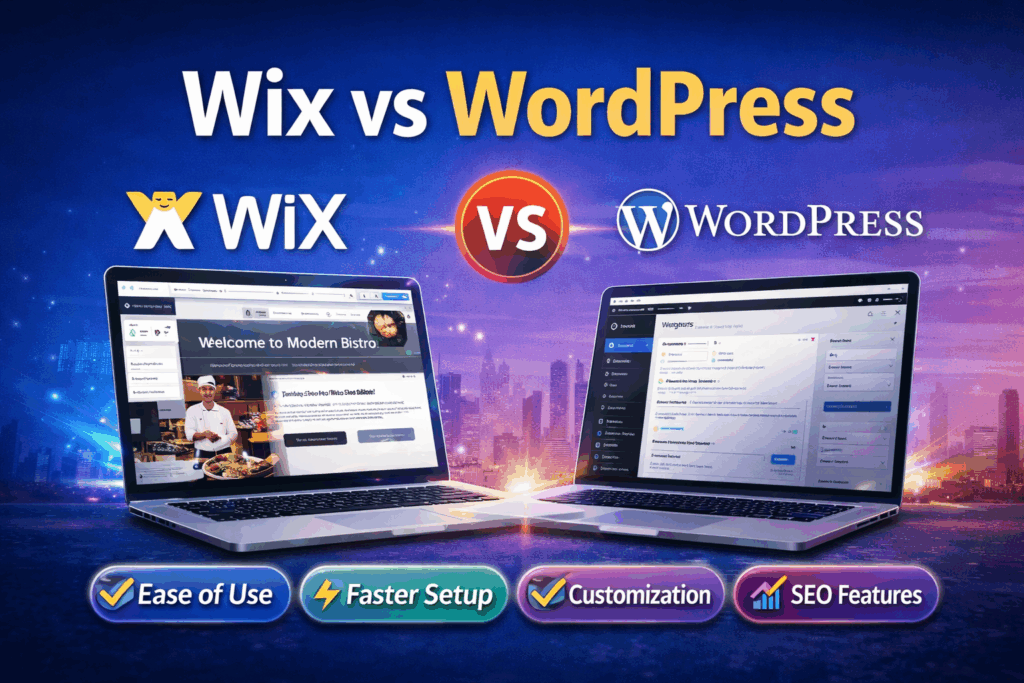
Wix Web Builder vs WordPress: Which Platform Is Better for Your Website in 2026?
Choosing between Wix and WordPress is one of the most important decisions when building a website. Both platforms are powerful, but they serve very different types of users.
In this detailed comparison, we’ll break down everything you need to know about the Wix Web Builder and how it stacks up against WordPress.
1. Ease of Use
Wix Web Builder
The Wix Web Builder is designed specifically for beginners and non-technical users.
- Drag-and-drop editor (no coding required)
- Pre-designed templates ready to use
- Visual editing—what you see is what you get
- Everything works out of the box
👉 You can build a complete website in just a few hours.
WordPress
WordPress offers flexibility, but it comes with a learning curve.
- Requires understanding of dashboard and settings
- You need to install themes and plugins
- Basic technical knowledge is helpful
👉 Beginners often feel overwhelmed initially.
✅ Winner: Wix Web Builder (Perfect for beginners and fast setup)
2. Customization & Flexibility
Wix Web Builder
The Wix Web Builder provides a wide range of customization options, but within a controlled environment.
- 800+ designer templates
- Built-in design elements
- Limited access to backend code
👉 Great for most users, but not ideal for highly complex projects.
WordPress
WordPress is known for unlimited customization.
- Thousands of themes and plugins
- Full control over code
- Can build anything from blogs to SaaS platforms
👉 Ideal for developers and advanced users.
✅ Winner: WordPress (Unlimited flexibility)
3. Pricing & Cost Structure
Wix Web Builder
With the Wix Web Builder, pricing is simple and predictable.
- Monthly subscription plans
- Hosting included
- Free SSL and basic features
- No need to buy separate tools
👉 Best for users who want an all-in-one solution.
WordPress
WordPress itself is free, but actual costs can add up:
- Hosting fees (₹2,000–₹10,000/year or more)
- Premium themes and plugins
- Developer costs (if needed)
👉 Costs vary depending on complexity.
✅ Winner: Wix Web Builder (Budget-friendly and predictable for beginners)
4. SEO Capabilities
Wix Web Builder
The Wix Web Builder has improved significantly in SEO.
- Built-in SEO tools and checklists
- Easy meta tag editing
- Integration with Google Search Console
- Good for local SEO and small businesses
👉 Perfect for beginners learning SEO.
WordPress
WordPress dominates advanced SEO capabilities.
- Powerful plugins like Yoast SEO or Rank Math
- Full control over technical SEO
- Better for large-scale content strategies
👉 Ideal for SEO professionals and agencies.
✅ Winner: WordPress (Advanced SEO control)
5. Maintenance & Updates
Wix Web Builder
One of the biggest advantages of the Wix Web Builder is zero maintenance.
- Automatic updates
- Hosting managed by Wix
- No technical headaches
👉 Focus only on your business, not technical issues.
WordPress
WordPress requires ongoing maintenance:
- Regular plugin and theme updates
- Security monitoring
- Backup management
👉 Can become time-consuming.
✅ Winner: Wix Web Builder (Hassle-free experience)
6. Security
Wix Web Builder
The Wix Web Builder provides built-in security.
- SSL included
- Automatic updates
- Protection managed by the platform
👉 No need to worry about vulnerabilities.
WordPress
Security depends on how you manage your site:
- Requires security plugins
- Depends on hosting quality
- Risk increases with poor maintenance
👉 Needs active management.
✅ Winner: Wix Web Builder (Fully managed security)
Final Verdict: Wix Web Builder vs WordPress
Choose Wix Web Builder if you:
- Want a beginner-friendly platform
- Need a fast and easy setup
- Prefer an all-in-one solution
- Don’t want to handle maintenance
Choose WordPress if you:
- Need full control and scalability
- Plan advanced SEO strategies
- Want deep customization
- Have technical knowledge (or a developer)
Clear Winner
The Wix Web Builder is perfect for freelancers, small business owners, and beginners who want to launch quickly without technical complexity.
On the other hand, WordPress is better suited for developers, agencies, and large-scale projects that require complete flexibility.
Pros and Cons of Wix Web Builder
✅ Pros of Wix
- Easy to use
- No coding required
- Fast setup
- All-in-one platform
- Built-in SEO tools
- Mobile optimized
- Secure hosting
❌ Cons of Wix
- Limited flexibility compared to WordPress
- Hard to switch templates after publishing
- Not ideal for very large websites
- Slightly higher long-term cost than self-hosted WordPress
SEO Optimization Tips for Wix Websites
If you want to rank your Wix website on Google, follow these strategies:
1. Keyword Optimization
Using the right search terms is the foundation of any successful search strategy. When building or updating your site, strategically integrate highly searched phrases into your content, headings, and URLs.
Be sure to naturally use keywords like:
- Wix web builder
- Wix website maker
- Wix website designs
Instead of forcing these terms into every paragraph, aim to weave them into areas where they provide genuine context for your readers, such as your homepage introduction or service descriptions.
2. On-Page SEO
On-page SEO tells search engines exactly what your individual pages are about. Wix simplifies this process through its built-in SEO Dashboard, allowing you to edit backend elements without needing to touch code.
- Optimize titles and meta descriptions: Write compelling title tags (under 60 characters) and meta descriptions (under 160 characters). Include your primary search terms toward the front of the title to maximize impact.
- Use proper headings (H1, H2, H3): Structure your content using a clear hierarchy. Every page should have exactly one H1 tag containing your primary topic or keyword, followed by H2 and H3 tags to break up subsections.
- Add internal links: Connect your pages to one another. Linking from a high-traffic blog post to a product page helps search engine crawlers discover your content and passes along valuable “ranking authority.”
3. Local SEO
If your business serves a specific geographic area, local optimization ensures you show up when nearby customers search for your services.
- Create a Google Business Profile: This is a crucial step for local visibility. Link your Wix site directly to your verified profile so you can appear in Google Maps and local map packs.
- Add location-based keywords: Don’t just target general terms; combine them with your city or region (e.g., “Wix website designs in Austin”). Use these localized phrases in your text and meta tags.
- Use schema markup: Schema is a structured data code that helps search engines understand specific details about your business. Wix features a built-in Local Business Schema tool that automatically formats your address, hours, and contact info for search crawlers.
4. Speed Optimization
Google uses page speed as a direct ranking factor, and users will quickly abandon a site that takes too long to load. While the Wix web builder automatically optimizes your site infrastructure and uses global content delivery networks (CDNs) to speed up loading times, your design choices heavily impact performance.
- Compress images: Uploading massive, uncompressed image files is the most common cause of slow Wix sites. Convert your images to modern web formats like WebP and compress them before uploading to ensure crisp visuals without the heavy file size.
- Avoid heavy animations: While parallax scrolling and complex video backgrounds look impressive, they require significant processing power. Limit interactive elements and heavy animations to keep your mobile loading times fast and responsive.
5. Content Marketing
Publishing high-quality, relevant content is one of the most effective ways to build authority and drive continuous traffic to your site.
- Publish blogs regularly: Use Wix’s native blogging platform to share insights, industry news, and guides. Consistent updates signal to Google that your website is active and relevant.
- Use long-tail keywords: Long-tail keywords are longer, more specific phrases that searchers use when they are closer to making a decision (e.g., “how to customize a template in the Wix web builder”). These terms usually have lower competition, making them easier to rank for quickly.
- Answer user queries: Look at sections like Google’s “People Also Ask” to find common problems your target audience is facing. Dedicate blog posts or FAQ sections to thoroughly answering these questions. Providing direct, valuable answers is the fastest way to earn featured snippets at the top of search results.
Who Should Use Wix Website Builder?
Wix is ideal for:
- Local businesses
- Freelancers
- Agencies
- Consultants
- Small e-commerce stores
Who Should Avoid Wix?
Wix may not be suitable for:
- Large enterprise websites
- Complex web applications
- Highly customized platforms
Future of Wix Web Builder
Wix is continuously evolving with:
- AI-powered tools
- Automation features
- Advanced SEO capabilities
It is becoming a strong competitor to platforms like WordPress.
Conclusion
The Wix Web Builder is one of the best tools available today for creating professional websites quickly and affordably.
For small and local businesses, it offers:
- Ease of use
- Cost efficiency
- Powerful marketing tools
While it may not replace WordPress for advanced users, it is undoubtedly the best choice for beginners and growing businesses.

Frequently Asked Questions (FAQs)
1. Is Wix good for SEO?
Yes, Wix offers built-in SEO tools that are perfect for small businesses and local SEO.
2. Can I create a professional website using Wix?
Absolutely. Wix provides high-quality templates and customization options.
3. Is Wix better than WordPress?
It depends:
- Wix is better for beginners
- WordPress is better for advanced users
4. How much does Wix cost?
Wix offers:
- Free plan
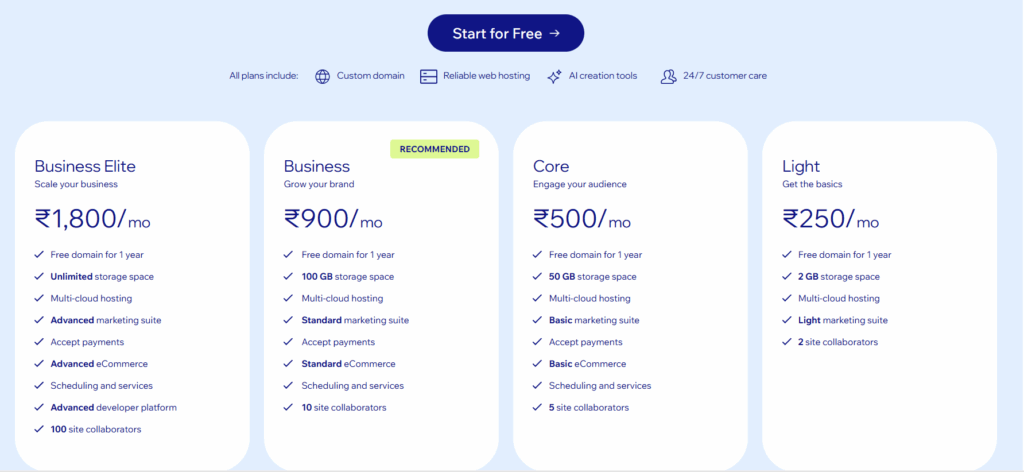
- Premium plans starting at affordable monthly rates
5. Is Wix good for small businesses?
Yes, Wix is one of the best platforms for small business owners due to its simplicity and affordability.
6. Can I switch from Wix to WordPress later?
Yes, but it requires manual migration.
7. Does Wix provide hosting?
Yes, Wix includes hosting with all plans.
8. Is Wix suitable for e-commerce?
Yes, Wix supports small to medium-sized online stores. Yes, the Wix Web Builder is highly suitable for building and managing small to medium-sized online stores. It provides an all-in-one e-commerce solution that allows business owners to launch a digital storefront without needing to know how to code.
Also Read:
How AdWords Helped a New Jersey Packers & Movers Company Generate Massive Leads
How Pay Per Click Advertising Helped a Goa Travel Company Sell More Thailand Tour Packages
Final Thoughts
If you’re a local business owner or freelancer looking to build your online presence quickly, the Wix Website Maker is a powerful and reliable choice.
It helps you:
- Launch faster
- Save money
- Generate leads
And most importantly—it lets you focus on growing your business instead of worrying about technology. Ready to take your business to the next level? Don’t wait for customers to find you—let a certified Google Ads expert create a tailored advertising strategy that drives calls, bookings, and real results. Click the button below to book your appointment now and start generating high-quality leads today!

Leave a Reply